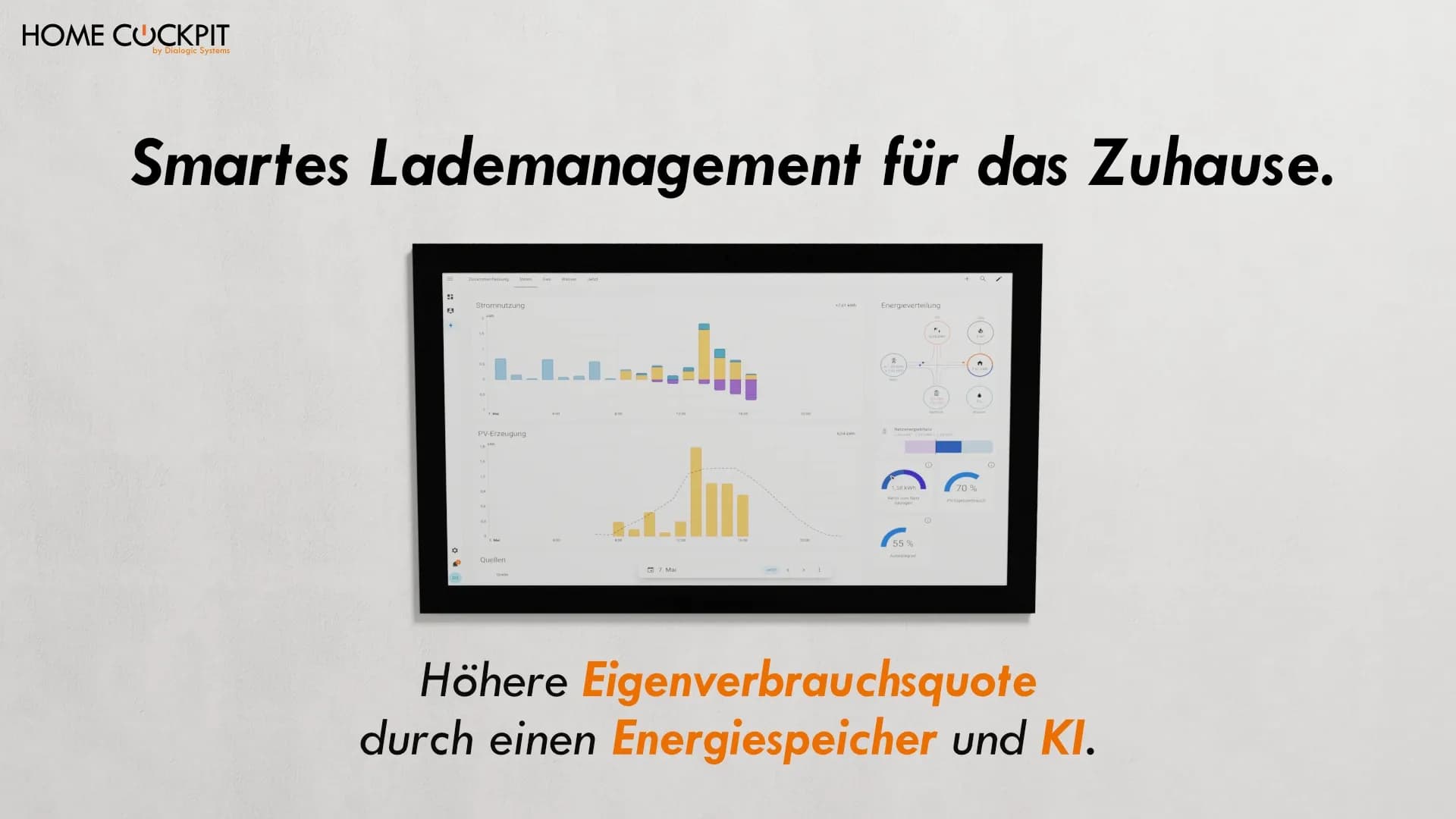
Energy-efficient Smart Home: Get more out of your photovoltaic system with Home Assistant and KNX
PV system on the roof, but the electricity mainly flows into the grid.
Many homeowners know this: The inverter produces surplus during the day, while the washing machine, heating, and wallbox run at times when there is little or no solar power available.
What's missing is the link between electricity generation, consumption, and storage.
Why photovoltaics alone doesn't make you self-sufficient
A PV system generates electricity when the sun shines. Your household consumes electricity when it's needed. These two curves rarely match.
Without active management, a large part of the generated electricity ends up in the grid. The feed-in tariff is far below the purchase price. Anyone who wants to increase their self-consumption share needs a system that activates consumers when there is a surplus.
The following graphic shows the difference:
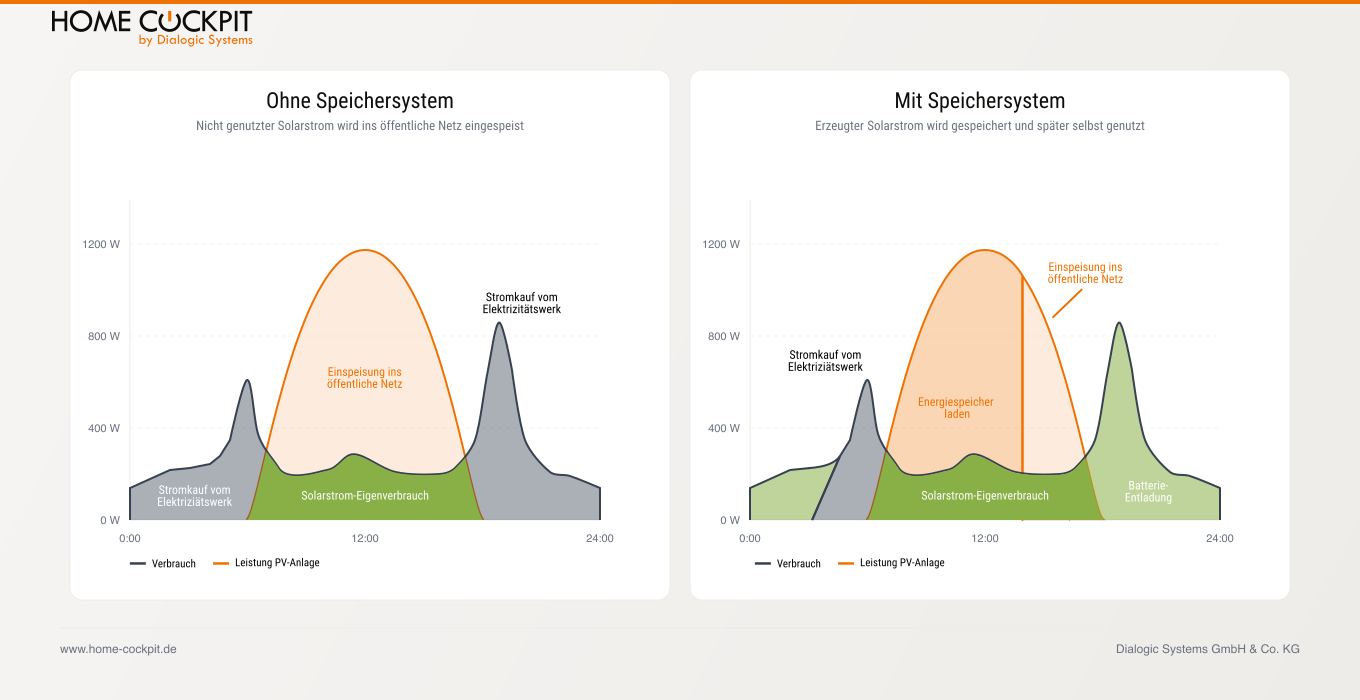
Comparison: PV system without vs. with storage system
Left (without storage): The generated solar power (orange curve) significantly exceeds self-consumption (green area). The surplus flows into the grid. In the morning and evening — when consumption is high but there is no sun — electricity must be purchased expensively (dark areas).
Right (with storage): The surplus is temporarily stored in the home battery. In the evening, the battery discharges and covers consumption from its own production. Grid consumption is reduced to a minimum.
The goal of charge management is precisely this transition: from the left to the right scenario.
Charge management: What this means in practice
Charge management means: Consumers are not switched on according to a schedule, but based on current production and consumption data. If a home battery is involved, its charge level is also included.
Typical controlled loads:
Wallbox: Charge e-car when PV surplus is available
Heat pump or heating: Adjust preheating curves to predicted sunshine hours
Home battery: Charge with surplus, discharge during peak consumption
The goal: Consume self-generated electricity in the house instead of feeding it cheaply into the grid and buying it back expensively.
Home Assistant as the control center for PV, KNX, and IoT
Home Assistant is a widely used open-source platform for smart home and building automation. Particularly relevant for this use case: The platform understands multiple protocols simultaneously.
Existing KNX devices, an inverter with a Modbus interface, a wallbox via Modbus or manufacturer-specific integration, a home battery via MQTT. There are separate Home Assistant integrations for each of these device types. All data points land in a common data model that your automations can access directly.
The KNX integration is particularly interesting for existing installations. Group addresses can be addressed directly. An actuator that previously only switched manually or according to a schedule can thus react to the current solar yield.
Where AI comes into play
The term AI is used broadly in this context. It usually refers to rule-based automations supplemented by prediction models.
Specifically, this means:
Weather-based forecasts: Integrations like Solcast (via HACS) provide hourly PV yield forecasts for the next day — depending on the provider's API limit, with multiple updates per day. Home Assistant can thus plan charging processes proactively, not just control them reactively.
Consumption patterns: From historical data, the system can recognize when consumption peaks typically occur and plans charging processes accordingly.
Dynamic electricity tariffs: In combination with dynamic tariffs (e.g., Tibber or Awattar), optimization is based not only on PV yield but also on the wholesale electricity price.
The result: The system decides not based on a fixed schedule, but simultaneously based on current solar yield, forecast, storage level, and electricity price.
An automation to get started: Charge car when conditions are right
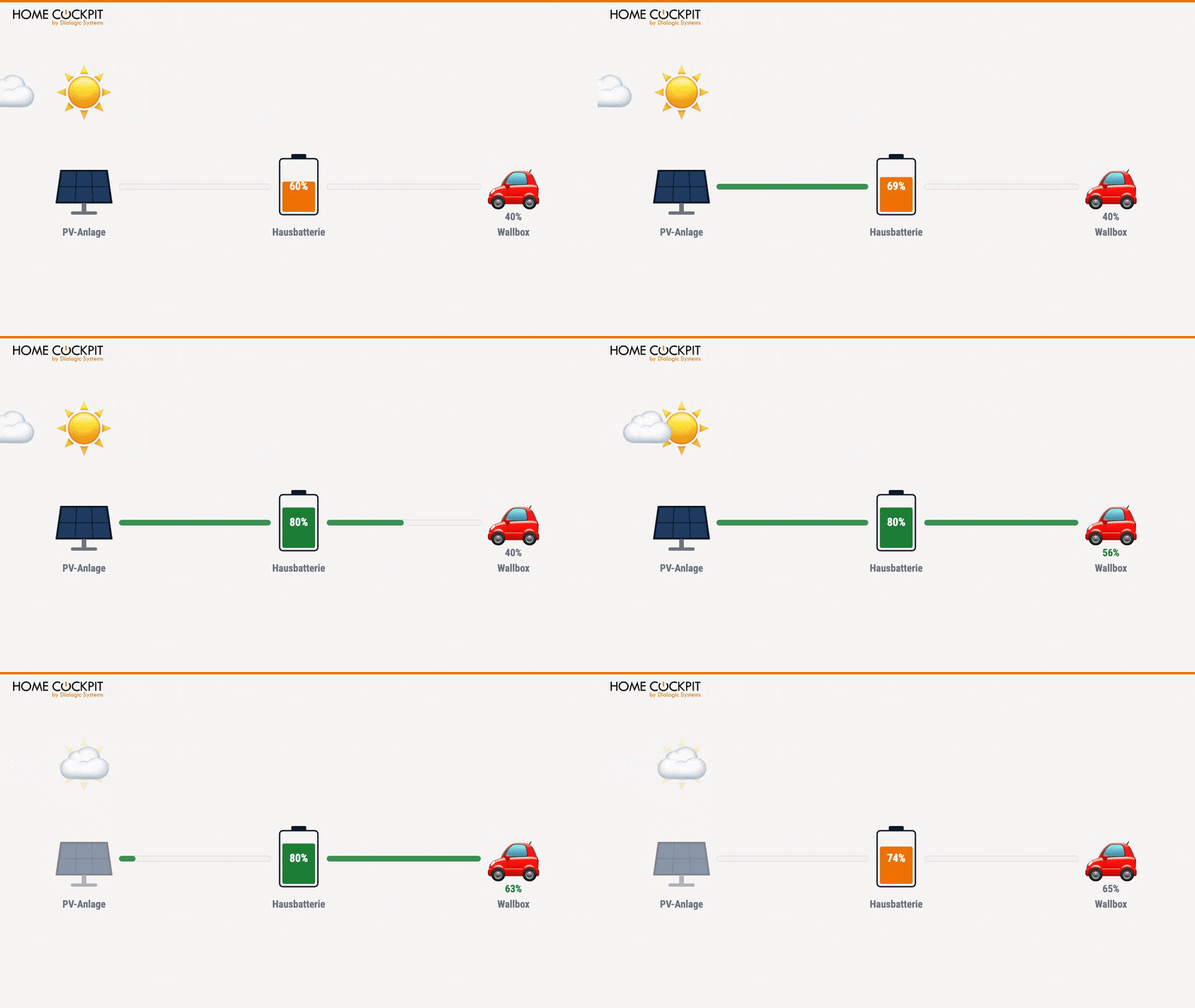
A simple entry into this automation could be the following scenario: Your car should only charge when the sun is producing enough and the home battery is already well-charged. This way, charging the car does not come at the expense of the home battery.
The logic behind this can be summarized in two simple rules:
Rule 1: Turn on wallbox
The car should charge when all of the following conditions are met simultaneously for at least 5 minutes:
PV surplus is above 1,500 watts
Battery storage is charged to at least 80%It is between
7:00 AM and 8:00 PMThe wallbox is currently
offRule 2: Turn off wallbox
Charging stops when
one of the following conditions applies for at least 5 minutes:PV production drops below
1,000 wattsBattery storage drops below
65%Car battery is charged to
95%Why these values?Two different thresholds (80% on / 65% off):
The gap prevents the wallbox from constantly switching on and off due to small battery fluctuations. Without this buffer, the system would react every second at a battery level of exactly 80%.
5-minute delay: Passing clouds can briefly push PV production below the threshold. Without a delay, the wallbox would stop at every little cloud and restart shortly thereafter. The waiting time makes the behavior significantly calmer.
In Home Assistant, this logic can be implemented as an automation. From here, you can expand: define minimum charging time, include Solcast forecasts as an additional condition, or additionally control based on wholesale electricity price with dynamic tariffs (Tibber, Awattar).INSERT IMAGE HERE EnergyFlow.mp4 / Energyflow.gif
Prerequisites for setup
For this setup, you will need:
PV system with readable interface
(Modbus, SunSpec, or manufacturer API)
Home Assistant on a dedicated device (e.g., Home Assistant Yellow / Green, Raspberry Pi 5, Intel NUC, or a VM on NAS / Server)
KNX installation with appropriate group addresses for the actuators to be controlled
Optional: Home battery, wallbox, heat pump
HomeCockpit as a visualization centerThose who see how much electricity is currently being produced and consumed make better decisions. This applies to you as an operator as well as to your cohabitants.
The HomeCockpit touch panel serves as a central display location. Dashboards can be made permanently visible via the integrated browser: current feed-in, storage level, self-consumption rate, forecast for the day.
In the recommended architecture, Home Assistant runs on a
dedicated device
— such as a Home Assistant Yellow, an Intel NUC, or as a VM on a NAS or server. The HomeCockpit panel is the client and displays the dashboards in the browser, while simultaneously serving as the central user interface. The advantage of this separation: updates or restarts on the display device do not interrupt the home automation — and vice versa. The Excelsior and ExcelsiorPLUS series panels would have enough power to run Home Assistant in parallel with visualization, but in practice, clean server/client separation is the more robust setup.ConclusionIf you already have a PV system and KNX devices in your home, the foundation for real energy management is laid. Home Assistant can connect both and turn static schedules into dynamic, forecast-based automations. The touch panel displays the result and actively controls.
Complete self-sufficiency is not realistic in most single-family homes. A significantly higher self-consumption share, however, is.
Frequently Asked Questions about Charge Management with Home Assistant and KNX
Can Home Assistant communicate directly with KNX?
Yes. Home Assistant offers a native KNX integration that can read and write directly to group addresses. A KNX/IP interface or KNX/IP router on the local network is required.
Which PV inverters are compatible with Home Assistant? Most common manufacturers are supported: SMA, Fronius, SolarEdge, Huawei, Sungrow, and many others via Modbus, SunSpec, or manufacturer-specific APIs. For the complete integration list, the official Home Assistant documentation is recommended.
Should Home Assistant run directly on the HomeCockpit touch panel? It is technically possible: The Excelsior and ExcelsiorPLUS panels have enough power under Windows 11 Pro to run Home Assistant as a Hyper-V VM or Docker container in parallel with visualization. In practice, however, we recommend a different setup: Home Assistant runs on a dedicated device (e.g., Home Assistant Yellow, Intel NUC, or a VM on NAS / Server) and the HomeCockpit panel displays the dashboards in the browser. The advantage: server and display device are decoupled — updates, restarts, or maintenance on one device do not interrupt the other. Exactly the separation that is standard in a KNX system between the IP router and visualization anyway.
What is the difference between charge management and simple time control? Time control switches devices at fixed times. Charge management reacts to real-time data: inverter yield, storage level, current consumption, and forecast. The result is a significantly higher self-consumption share because the system reacts flexibly to the actual situation.
Are there alternatives to Home Assistant for PV surplus charging? For pure surplus charging at the wallbox, evcc (EV Charge Controller) is a common alternative. For the more comprehensive approach with KNX integration, battery, and heating control, Home Assistant is the more flexible solution.
Configure HomeCockpit or get adviceAre you planning an energy management system and want to know which touch panel is suitable for your setup?
Configure your touch panel directly online or call us: We will advise you on which model best suits your situation.
Are you planning an energy management system and want to know which touch panel is suitable for your setup?
Configure your touchpanel directly online or give us a call: We will advise you on which model best fits your specific situation.